
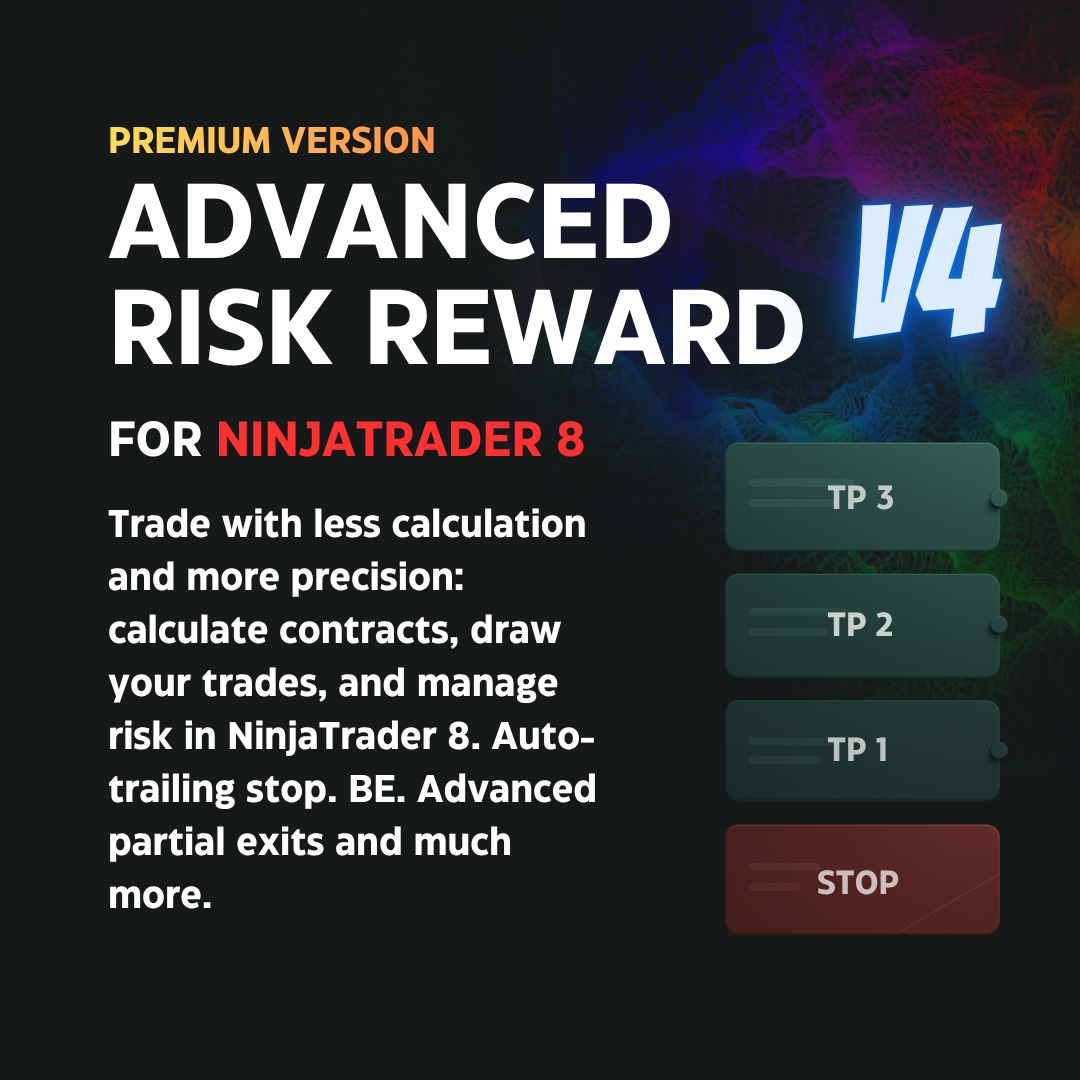
Advanced Risk Reward V4 for NinjaTrader 8
Do you want to trade in NinjaTrader 8 with fewer manual calculations, better risk control, and faster trade management?
📊 Advanced Risk Reward V4 for NinjaTrader 8
Advanced Risk Reward V4 is a tool designed to help you plan, execute, and manage your trades directly from NinjaTrader, integrating with the Chart Trader and with the visual management of entry, stop loss, and target levels.
In a real trade, finding a good entry is not the only thing that matters. You also need to define how much you are going to risk, calculate the correct number of contracts, place your stop loss, distribute your contracts across different objectives, protect the trade, and adjust your orders if the market changes.
Doing all of this manually can take away time, precision, and concentration. That is why Advanced Risk Reward V4 turns your risk plan into a visual, dynamic, and operational structure directly inside the chart.
The tool allows you to draw entry, stop loss, and take profit levels, automatically calculate contracts according to your risk, work with NinjaTrader’s native ATM orders, and manage the trade from a practical interface inside the Chart Trader.
✅ Main Features
Before entry
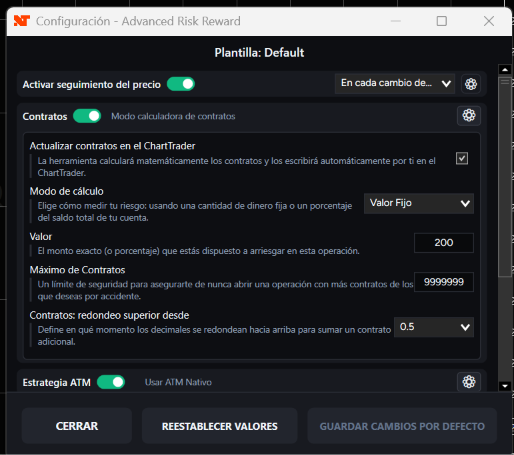
- Automatically calculates the number of contracts according to the defined risk, either by a fixed amount or by a percentage of the account.
- Allows you to set a maximum contract limit and a rounding rule to prevent the tool from calculating a higher quantity than desired.
- Can automatically update the number of contracts in the Chart Trader.
- Allows you to choose between two ways of working with the stop loss: StopPorEstructura or StopDistanciaFija. In fixed distance mode, you can define an initial distance in ticks for the stop.
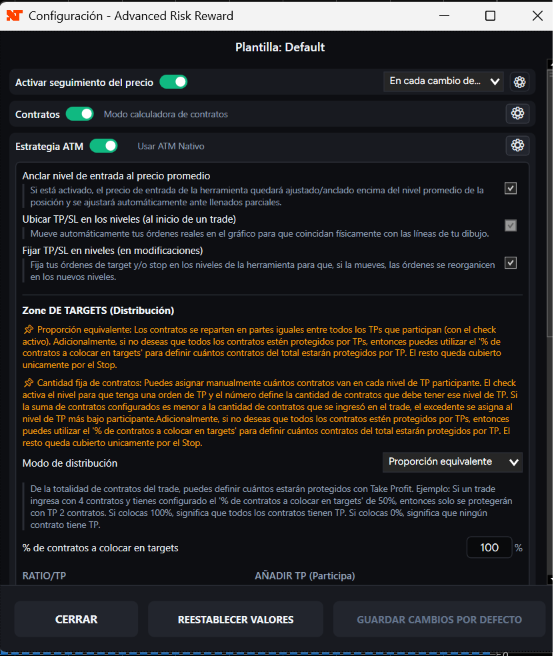
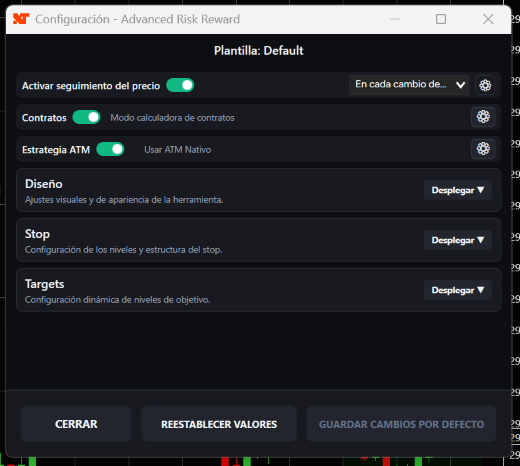
- Includes price tracking, configurable to update on each tick change or at the close of each bar.
- Allows you to anchor the entry level to the average price of the position, so the tool can readjust when you add new entries and the average price changes.
Entry and orders
- Provides quick access through a floating control panel on the chart to draw the tool, configure templates, place orders, and manage trades.
- Includes quick buttons to prepare entry orders such as Buy ST/LT and Sell ST/LT, allowing you to place limit or stop market orders according to the price selected on the chart.
- Can automatically place TP and SL orders at the tool’s levels when starting a trade.
- Allows orders to adjust to the new configured levels if you modify the tool during a live trade.
Management and references
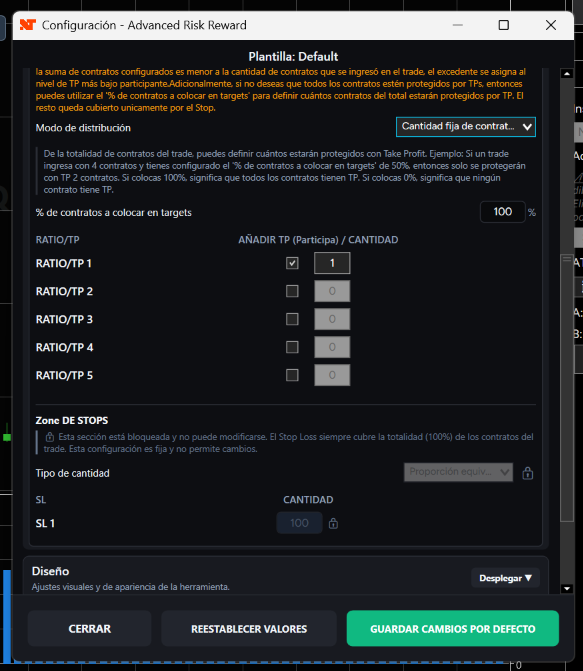
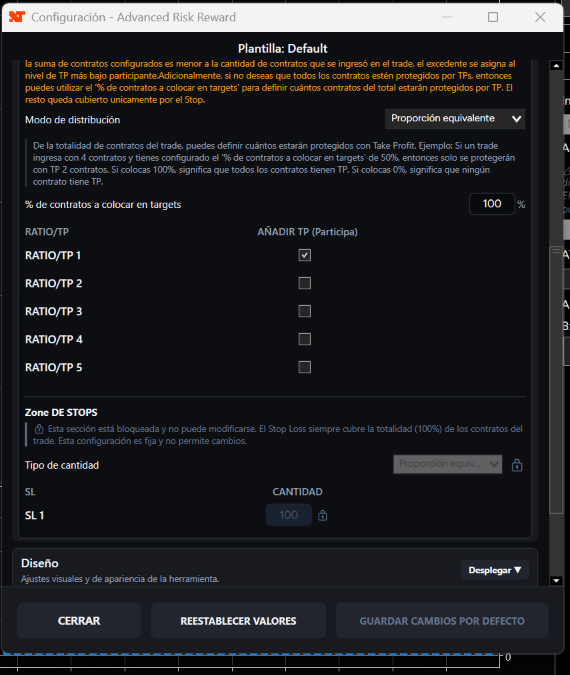
- Allows you to enable or disable the target levels that will participate in contract distribution.
- Allows you to decide what percentage of the total trade contracts will be placed in take profit.
- Offers two ways to distribute contracts among targets: evenly or through fixed quantities per level.
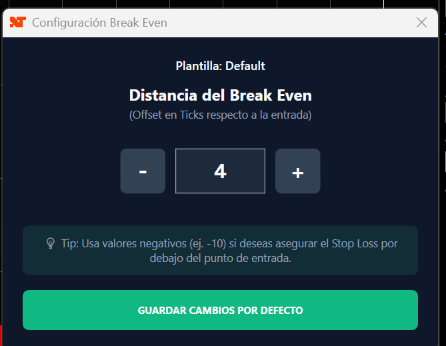
- Includes manual Break Even in a single click, with configurable offset in ticks.
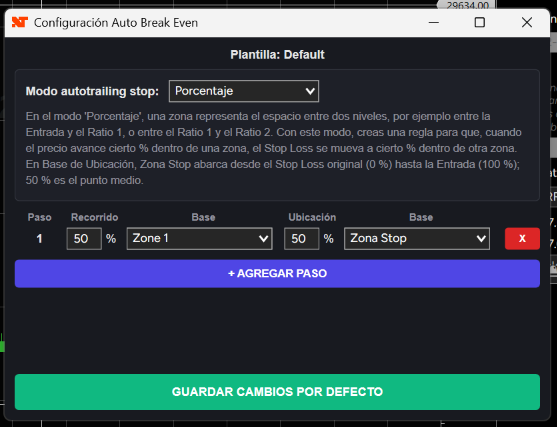
- Includes Autotrailing Stop configurable by ratios, ticks, or zone percentage.
- Works with interchangeable templates to adapt the tool to different trading styles, accounts, instruments, or configurations.
- Allows you to display the tool’s levels in price, ticks, or points.
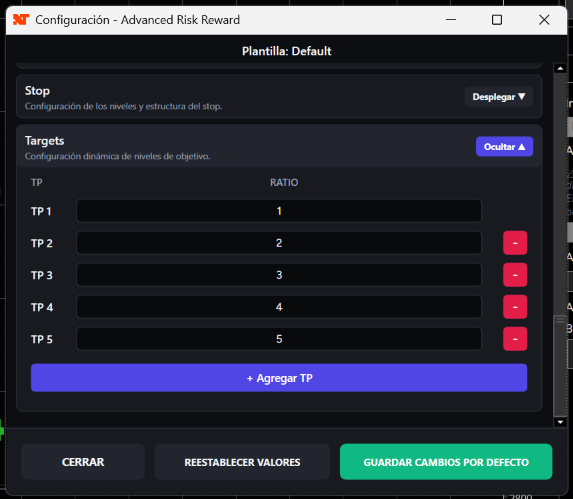
- Allows you to use multiple targets and multiple visual stop loss references to better structure the trade.
In summary, Advanced Risk Reward V4 helps you reduce manual calculations, maintain more organized risk management, and trade with greater precision inside NinjaTrader 8.
🎯 Quick Explanation of Each Feature
Quick access from a floating panel on the chart
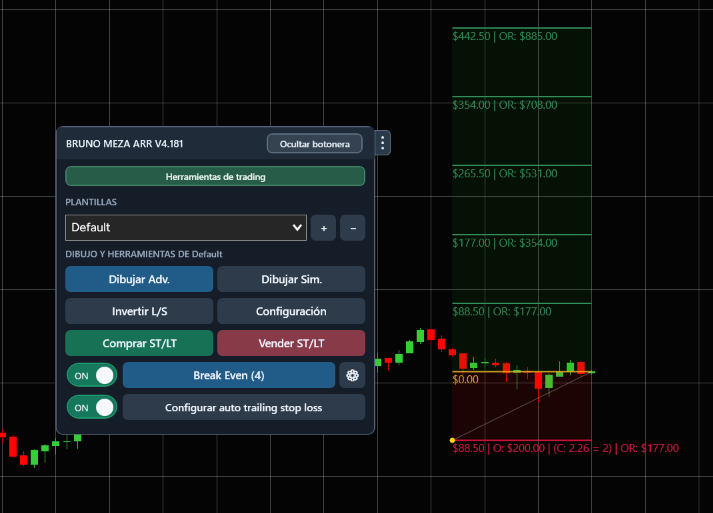
The tool provides a floating control panel on the chart, so you don’t have to navigate through complicated menus every time you want to use it. From there, you can draw the advanced tool, use the simple tool, select templates, configure settings, and access features such as Break Even, Auto Trailing, and quick orders.
This makes trading more practical, because everything stays close to the place where you normally manage your entries, exits, and contract quantity.
Contracts, limits and rounding
Automatic Contract Calculation
One of the most important features is that the tool can automatically calculate how many contracts you should use according to the risk you want to assume.
For example, if you decide to risk 200 dollars per trade, the tool takes the distance between your entry and your stop loss, calculates the value of that risk, and determines how many contracts correspond to it. This way, you do not have to make manual calculations while the market is moving.
You can also work with risk by account percentage. In that case, the tool calculates the trade size according to the account value and the selected risk percentage.
Maximum Contract Limit and Rounding Rule
The tool allows you to define a maximum number of contracts to prevent the automatic calculation from exceeding the size allowed by your strategy, your account, or your funding company.
It also includes a rounding rule. This is useful because the ideal calculation could result in a decimal number, such as 3.6 contracts, but in futures you need to trade whole contracts. With the rounding rule, you can decide when the tool should round up to the next contract or round down to the previous one.
Automatic Contract Update in Chart Trader
In addition to calculating the correct quantity, the tool can send that number directly to the contract selector in the Chart Trader.
This prevents you from having to manually change the quantity before entering. If the stop moves or the risk distance changes, the number of contracts can also update to remain consistent with the configured risk.
Prepare the entry
Buy ST/LT and Sell ST/LT Buttons
These buttons are designed for dynamic trading. When the number of contracts changes constantly, using NinjaTrader’s normal orders can cause you to send an order with an old quantity.
With the Buy ST/LT and Sell ST/LT buttons, you can prepare a waiting line on the chart. That line remains synchronized with the current Chart Trader quantity and, when you decide to confirm the entry, the order is sent with the correct quantity at that moment.
StopPorEstructura and StopDistanciaFija
The tool allows you to work with the stop loss in two ways.
With StopPorEstructura, the stop remains in a structural area of the chart. This is useful when you place your stop behind a high, low, technical zone, or market structure.
With StopDistanciaFija, the stop keeps a fixed distance from the entry. This is useful when your strategy works with stops of a specific number of ticks or points, without depending so much on a visual structure.
Price Tracking
Price tracking allows the tool to update its entry level according to market movement.
It can do this on each tick change, so the tool moves more immediately, or at bar close, so it only updates when a candle closes. This allows the tool to adapt to each trader’s style: faster and more aggressive, or calmer and based on candle closes.
Anchoring to the Average Price
When you add new entries to a position, the average price can change. The tool allows you to anchor the entry level to that average price, so the chart better reflects the real state of your open position.
This is especially useful when you average in, scale into entries, or increase contracts during a trade. Instead of being left with an old visual entry, the tool can readjust to the new real average.
Visual references and real contracts
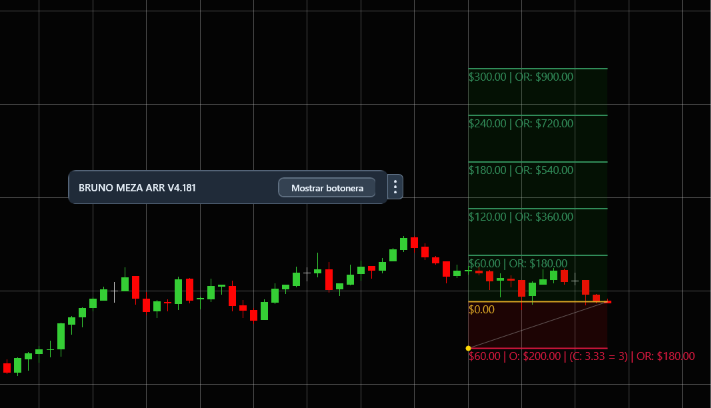
Automatic Placement of TP and SL at the Tool’s Levels
The tool can place take profits and stop losses at the visually defined levels.
This means that the levels you see on the chart are not only visual references, but can become the real basis for organizing your ATM orders. The idea is for your visual structure and your operational management to be aligned.
Order Adjustment When Modifying the Tool Live
If you are already inside a trade and you move the tool, you can allow the orders to adjust to the new levels.
This helps when you need to adapt the trade while it is open. For example, if you decide to move a target or adjust a visual reference, the tool can move the orders to those new prices, preventing you from having to modify them manually one by one.
Enabling or Disabling Target Levels
Not all visible targets necessarily have to participate in the real trade.
You can have several targets on the chart as visual references, but decide that only some of them will be used to place real contracts. This gives you flexibility to analyze several scenarios without forcing you to trade all levels.
Percentage of Contracts Assigned to Take Profit
The tool allows you to decide what part of the total contracts will go to targets.
For example, you can define that only a percentage of the position will be placed in take profits and that the rest will remain protected by the stop. This is useful when you do not want to close the entire position through targets or when you want to keep part of it open for later management.
Even or Fixed Distribution Among Targets
Even distribution distributes contracts in a balanced way among the active targets.
Fixed distribution allows you to indicate how many contracts you want to place at each level. For example, you can decide that the first target has more contracts and the following ones have fewer. This allows you to adapt management to more conservative, more aggressive, or more personalized strategies.
Break Even and Autotrailing
Manual Break Even in One Click
Manual Break Even allows you to move the stop to a protection zone with a single click.
You can also configure an offset in ticks, so the stop is not placed exactly at the entry, but slightly above or below depending on your configuration. This avoids slow manual movements and reduces the risk of making mistakes when protecting the trade.
Autotrailing Stop by Ratios, Ticks, or Zone Percentage
Autotrailing Stop allows you to automate the movement of the stop loss as the trade progresses.
You can configure it by ratios, by ticks, or by zone percentage. This provides more flexibility than a traditional trailing stop based only on ticks, because you can adapt protection to the real size of the trade, to the tool’s levels, or to the evolution of the trade.
A setup for each trading style
Interchangeable Templates
The tool works with templates so you can save different configurations.
You can have one template for scalping, another for day trading, another for different instruments, or even a different configuration for each trading style. Each template can save parameters from the main tool, contracts, ATM, Break Even, Autotrailing, and design.
Display in Price, Ticks, or Points
The tool’s levels can be displayed in different ways depending on what is most comfortable for you.
You can view them as exact prices, as distance in ticks, or as points. This helps you better interpret risk and potential reward depending on the instrument you are trading and the way you prefer to analyze your trades.
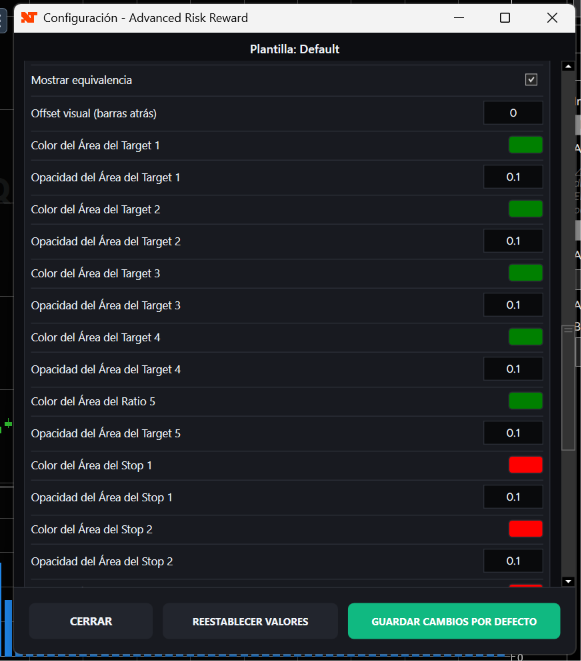
Multiple Targets and Visual Stop Loss References
The tool allows you to work with several targets and several visual stop loss references.
This helps structure more complete trades. You can analyze different exit levels, compare scenarios, and better visualize how risk and reward are distributed. Additionally, some references can serve only as visual support, without necessarily affecting the real ATM logic.
🛡️ Summary
Advanced Risk Reward V4 is not just a tool for drawing risk-reward. It is an operational tool for NinjaTrader 8 that helps convert your risk plan into a visual, dynamic, and manageable structure from the Chart Trader.
Its goal is to help you trade with fewer manual calculations, fewer execution errors, and more organized management of contracts, stop loss, targets, Break Even, trailing stop, and templates.
Instead of forcing you to recalculate everything in every trade, the tool takes the rules you have already configured and adapts them to the real market, to the distance between entry and stop, to the number of contracts, and to the evolution of the trade.
Compatibility and terms
- The calculated contracts follow the risk configuration defined by the user.
- Execution, slippage and results depend on the market and NinjaTrader.
Per-trade risk
Bring more control to your trading.
Explore the features and start with the tool you need.
FREE access to Trading Journal and Personal Finance when you buy any product
You will also obtain unlimited, free access to two exclusive tools from brunomeza.com: the Trading Journal and the Personal Finance section.
Explore related tools
![Backtester Manual Pro [Improve your odds]](/assets/optimized/backtester-en-01.webp)
Backtester Manual Pro [Improve your odds]
Run visual backtesting and examine results inside NinjaTrader 8 charts.
![NinjaTrader 8 to NinjaTrader 8 Trade Copier [Unlimited Accounts]](/assets/optimized/copier-nt8-en-01.webp)
NinjaTrader 8 to NinjaTrader 8 Trade Copier [Unlimited Accounts]
Copy trades across NinjaTrader 8 accounts with groups and per-account control.
