
NinjaTrader 8 to NinjaTrader 8 Trade Copier [Unlimited Accounts]
Can you imagine trading on one NinjaTrader account and having its actions automatically copied to multiple other accounts, whether they are from the same or a different prop firm/broker all on a single computer, with no additional or monthly costs? All connections are supported (Rithmic, Tradovate, CQG, etc.), as well as any type of market data and any combination of prop firm or broker (that can connect to NinjaTrader).
Futures copy trading software
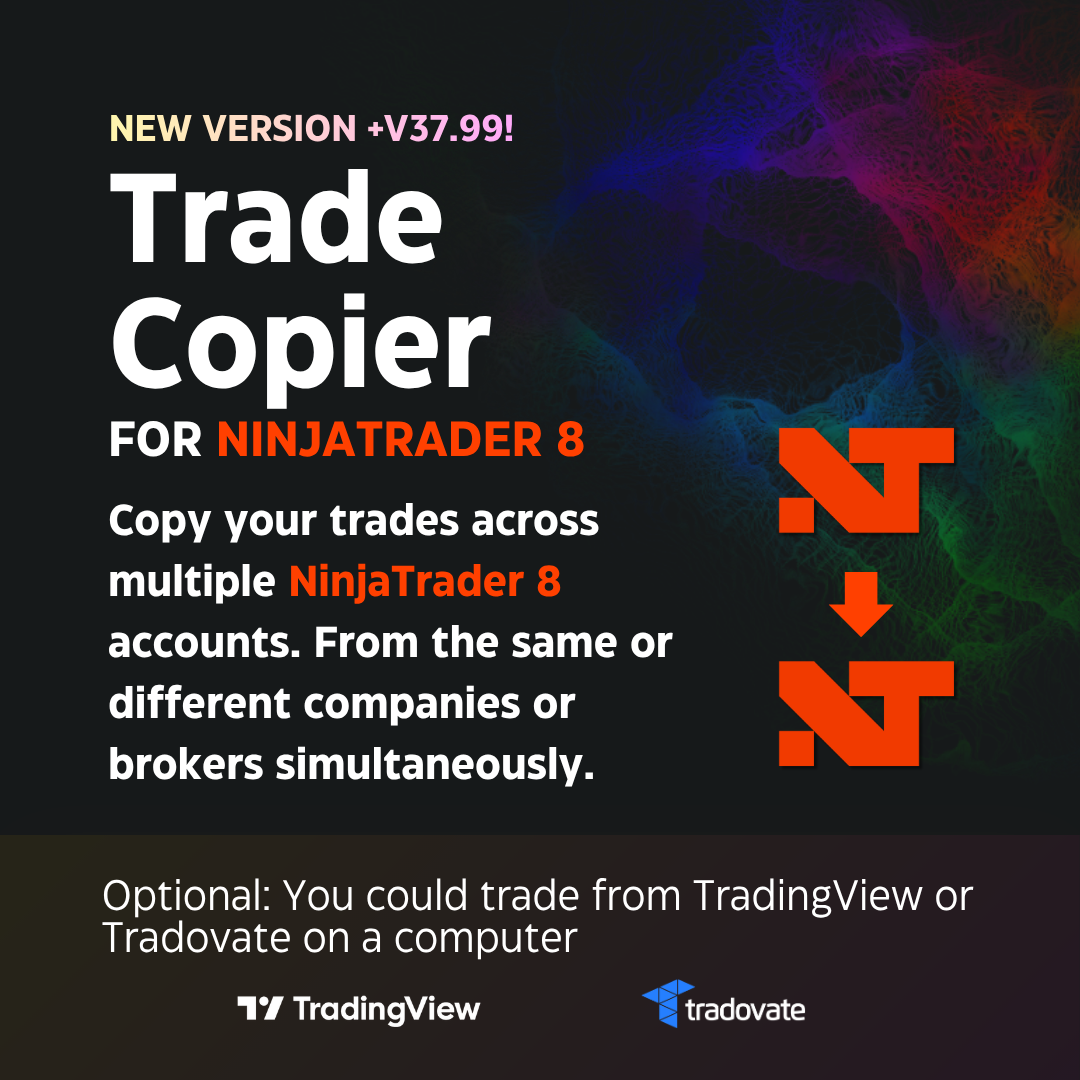
Trade Copier for NinjaTrader 8
Trade on one master account and automatically copy its trades to multiple follower accounts, even from different prop firms or brokers, from a single computer
With the NinjaTrader 8 to NinjaTrader 8 Trade Copier by BRUNO MEZA, it is possible. The BRUNO MEZA trade copier offers you exclusive features that no other trade copier on the market offers:
Copy trades to different prop firms without spending more money:
There is NO need to use virtual machines to trade with different prop firms. Everything will be managed optimally on the same computer, free of charge and for life. Do not spend another cent. Even if you use multiple prop firms with Rithmic, you will be able to trade them without restriction.Cutting-edge technology:
Cutting-edge, intelligent order execution technology. We have the best algorithms to execute your orders safely and intelligently.Telegram alerts:
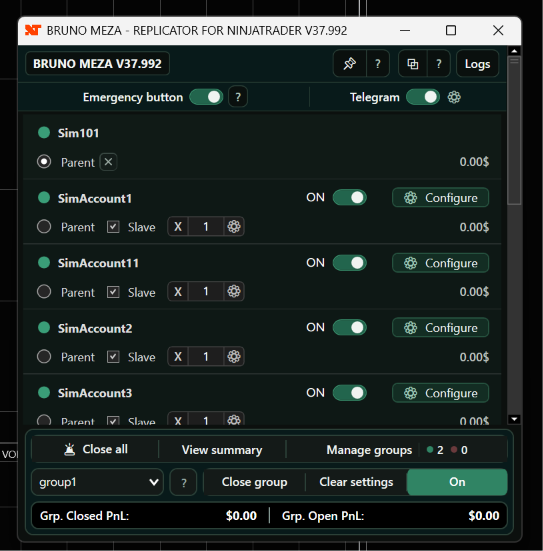
You can receive alerts on your phone through a Telegram chatbot if any replication event occurs. In addition, you can check the status of your accounts (profits, losses, number of orders, etc.) and perform actions on the trade copier (such as remotely closing trades), all through commands that you can send using the Telegram chatbot on your phone.Manage multiple replication groups:
You can quickly and easily configure different replication groups and copy each of them independently. For example, you can configure one group with 5 accounts, another with 3 accounts, and another with 2 accounts.Automatic false-position resolution:
Other trade copiers struggle with the inconvenient problem of false positions caused by communication errors between prop firms and NinjaTrader. The BRUNO MEZA trade copier resolves them automatically, without user intervention, using intelligent algorithms.Account monitor:
An account monitor adapted for real-time trading. More than just a control panel, it is designed to be used during live trading.Trade your master account from TradingView or Tradovate:
If you wish, you can trade your master account from TradingView or Tradovate. Remember that the trade copier IS for NinjaTrader 8, so you must keep NinjaTrader 8 open, with the connections to your master and follower accounts established alongside TradingView or Tradovate, for trades to be copied. It is NOT a native TradingView or Tradovate trade copier.Trading view and closing controls:
When it detects active trades, the trade copier can automatically switch to a view designed to monitor many accounts simultaneously. From there, you can close an individual account, a specific group, or all accounts using the emergency control.Daily limits per account:
You can set a maximum daily loss and a maximum daily profit for each follower account. When the configured limit is reached, the trade copier will close its open positions and disable replication for that account to prevent it from receiving new trades.Additional tools included:
Your purchase also includes access to additional tools offered with our products, such as the trading journal and personal finance manager.And much more:
Keep reading to discover everything!
1️⃣ How does replication work between different prop firms or brokers?
The NinjaTrader 8 to NinjaTrader 8 Trade Copier is designed to copy trades between accounts at the same firm or at different prop firms and brokers, and best of all, you can do it from a single computer.
Simple method: To copy trades between different firms, you can connect them all to the same NinjaTrader installation and replicate them. It is that simple!
Advanced method (supports every combination):However, we know that certain connections cannot be active together, or that users may want independence between prop firms and brokers for licensing and/or log purposes. For those cases, the BRUNO MEZA trade copier has a solution too!
If you CANNOT connect the firms in the same NinjaTrader instance (such as when you try to connect multiple Rithmic connections), or if you want greater independence between firms, no problem: the trade copier includes a program that allows you to open multiple NinjaTrader instances on the same computer and is 100% compatible with them. As a result, you can place each prop firm or broker independently in its own NinjaTrader instance and then copy trades between accounts across those instances.
The trade copier transfers signals from the “Master” account to all “Follower” accounts in every NinjaTrader instance you have opened. This ensures that trades are placed simultaneously across all your accounts, without additional costs or complex infrastructure.
Multi-provider compatibility:You can work with Tradovate, Rithmic, CQG, and other providers that connect to NinjaTrader 8. In a single instance, you can keep one Rithmic firm connected alongside your Tradovate connections and live NinjaTrader accounts. If you want to use two or more different firms with Rithmic simultaneously, you will need an additional NinjaTrader instance for each additional Rithmic connection.
Do not make it complicated! With the BRUNO MEZA trade copier, any combination you want is possible: you can copy your trades across different firms, all from your computer, without additional servers or complex infrastructure. Our trade copier was designed and programmed specifically to work without restriction across different NinjaTrader instances, making it unique in the market.
2️⃣ Exclusive advantages other trade copiers DO NOT have that make the BRUNO MEZA trade copier UNIQUE
The unique advantages offered only by the NinjaTrader 8 to NinjaTrader 8 Trade Copier by BRUNO MEZA , which distinguish it from every other option on the market, are:
Copy trades between accounts at different firms or within a single firm:
It does not matter which prop firm or broker you use, which connection you have, or which data type you use: any combination of prop firms or brokers can be replicated with the BRUNO MEZA account trade copier. You do not need VPS servers or additional machines, reducing costs and simplifying your operation.Execution protections
Intelligent ATM algorithms:
Unlike other trade copiers that automatically copy the full order quantity without checking how many contracts are actually filled—and may therefore send opposite or incorrect orders—the BRUNO MEZA trade copier copies orders and their changes, verifies how many contracts are actually filled (for example, 10 in the master account but only 5 in the follower), and immediately adjusts the target and stop levels to the 5 filled contracts while holding the remaining 5 until they can be filled. This way, the follower account always trades with the correct parameters and avoids unexpected or opposite positions.Queued target and stop system:
If the master account enters with five contracts but a follower account fills only two, the trade copier protects only the two contracts that were actually filled. If more contracts are filled later, it also places the corresponding protection according to the master account’s ATM. This prevents a Take Profit or Stop Loss with a quantity greater than the actual position from creating an opposite position.Automatic cleanup of remaining orders:
When a limit entry is not completely filled in a follower account, the remaining quantity could stay pending even after the trade has ended. The trade copier includes logic designed to detect and remove these orders associated with completed trades, preventing them from executing later and opening a position you no longer want.Safe-closing algorithms:
When the trade copier needs to close a position, it does not simply send a market order without considering what is happening around it. Its closing mechanisms attempt to prevent race conditions, such as a closing order and a Stop Loss being filled at almost the same time and ultimately creating an opposite position.Intelligent buttons:
For example, imagine that the master account has a long position of 10 contracts, but the follower account filled only 5 because there was insufficient liquidity. If the user presses the “Close” button on the master account, a sell signal for 10 contracts is generated. Other trade copiers would forward it unchanged to the follower, causing it to close its 5 long contracts and open 5 short contracts with the excess quantity. Our trade copier first applies a filter that checks the follower account’s actual position and the user’s intent, and sends only the sell order for the 5 contracts needed, ensuring precise execution and compliance with NinjaTrader’s rules for safe orders.Safety alerts:
If, for any reason, an account fails to close due to a problem with the platform or prop firm, the account trade copier will notify you through the account monitor and pop-up windows. It will not go unnoticed. These alerts are preventive and do not necessarily mean that a problem has been confirmed; their purpose is to draw your attention so that you can quickly review the account.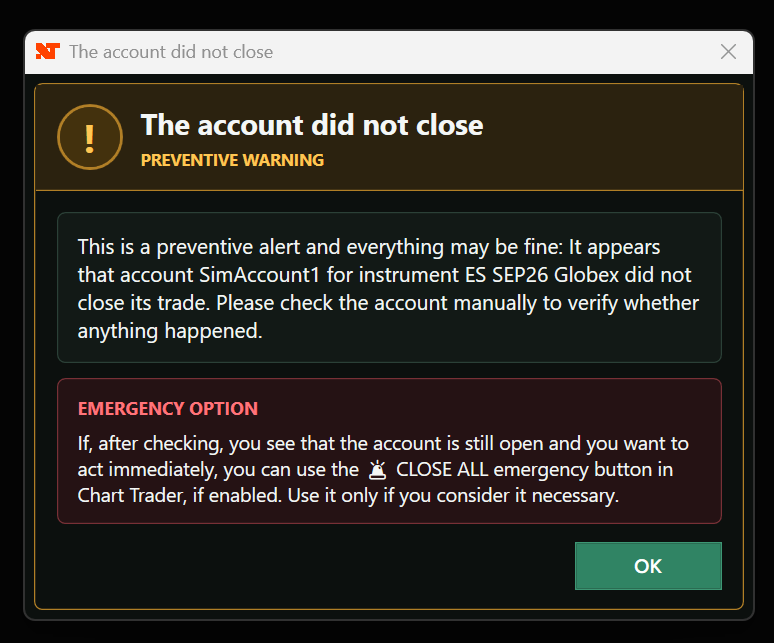
Settings for each account
Custom multipliers by instrument and account:
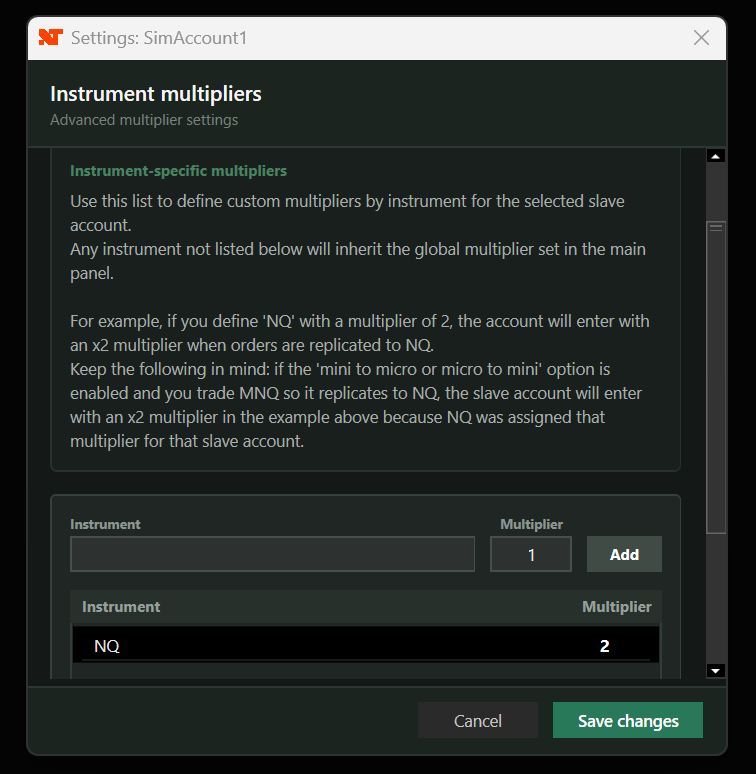
Go beyond the general multiplier. You can now define different multipliers by instrument, independently for each follower account! For example, you can configure a specific follower to trade NQ with a x2 multiplier and ES with x3. Any other instrument you trade that is not on that list will use your global multiplier. Precise risk management adapted to the capacity of each account!DOCUMENTED EXAMPLE · NOT A SOFTWARE SCREENSHOT
Other instruments use the global multiplier
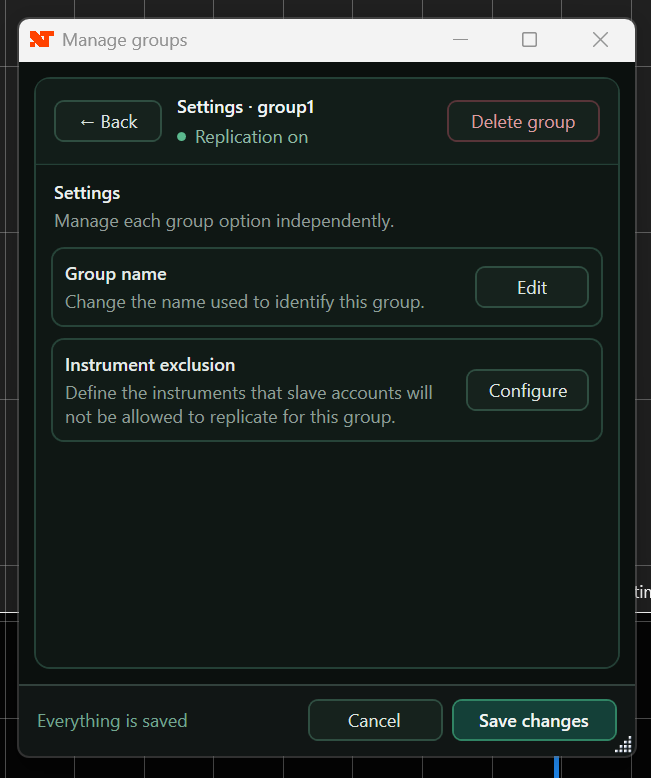
Instrument exclusions by group:
Easily define a list of blocked instruments (for example, NQ) so they are not copied within a particular group. If an instrument is on that list, the follower accounts in that group will simply ignore the entry. It is so intelligent that it detects the final instrument: if you convert from MNQ to NQ and NQ is excluded, the trade copier will block the order, perfectly enforcing your exclusion rules.Daily limits per follower account:
You can configure a maximum daily loss and a maximum daily profit. When an account reaches the established limit, the trade copier will close that account’s open positions and disable its replication to prevent it from receiving new trades. These limits function as a management tool that the user can modify later. If you are looking for restrictions specifically designed to prevent you from modifying your rules after reaching a limit, you can use the Emotional Manager for NinjaTrader 8.The account, the group and the complete set
Manage multiple replication groups:
You can quickly and easily configure different replication groups and copy each of them independently. For example, you can configure one group with 5 accounts, another with 3 accounts, and another with 2 accounts.Enable or disable replication by account and by group:
Each follower account has an ON/OFF switch that determines whether it will participate in new trades without requiring you to remove it from the configuration. You can also temporarily disable an entire group. Selecting a group only changes the group you are viewing; all other active groups continue copying normally.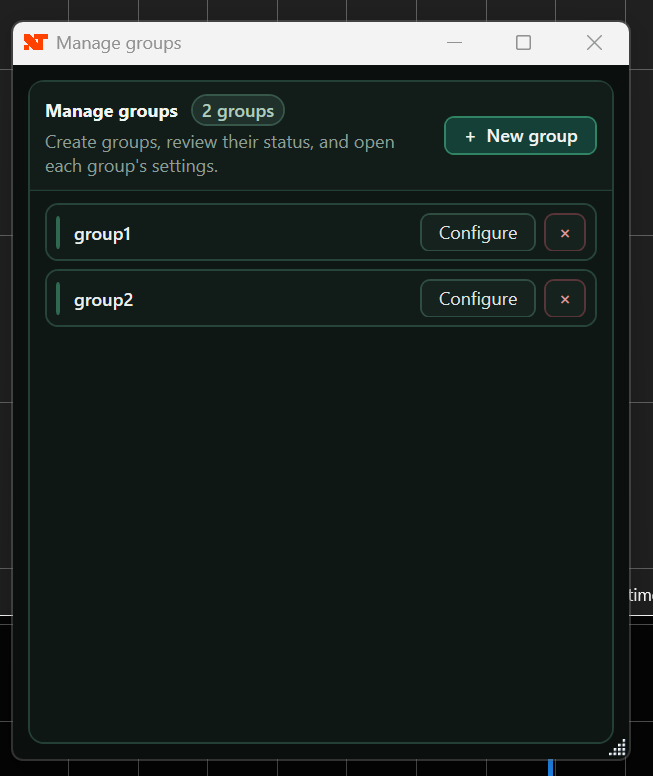
Free account monitor:
In trading, it is crucial to monitor how your accounts behave while trades are being copied. For that reason, we include an account monitor that lets you manage all your accounts without checking charts one by one. With the monitor, you can view the status of every account, close trades manually, and disable replication in real time.Automatic trading view:
When the trade copier detects activity, it can temporarily replace configuration elements with a view that prioritizes accounts, instruments, positions, orders, and quick-action controls. If trades exist in different groups, this view can centralize them so that you do not have to switch continuously from one group to another.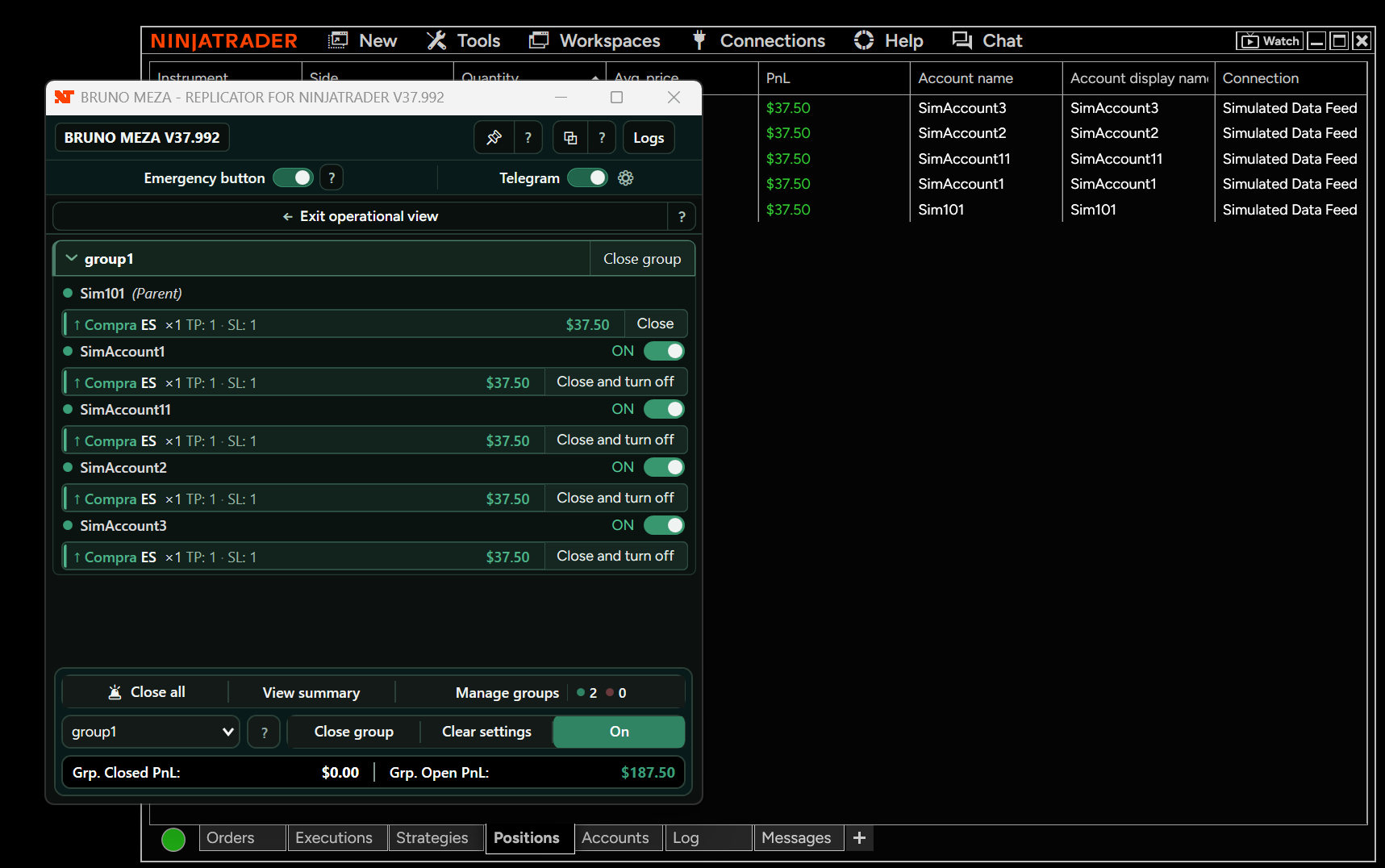
Individual, group, and global closing:
You can use “Close and disable” to close a follower account early and disable its replication, close only the accounts in one group, or use “Close all” as a general emergency control.Emergency closing from charts:
The emergency button can also be available directly inside Chart Trader on all your charts, allowing you to react without first searching for the main window.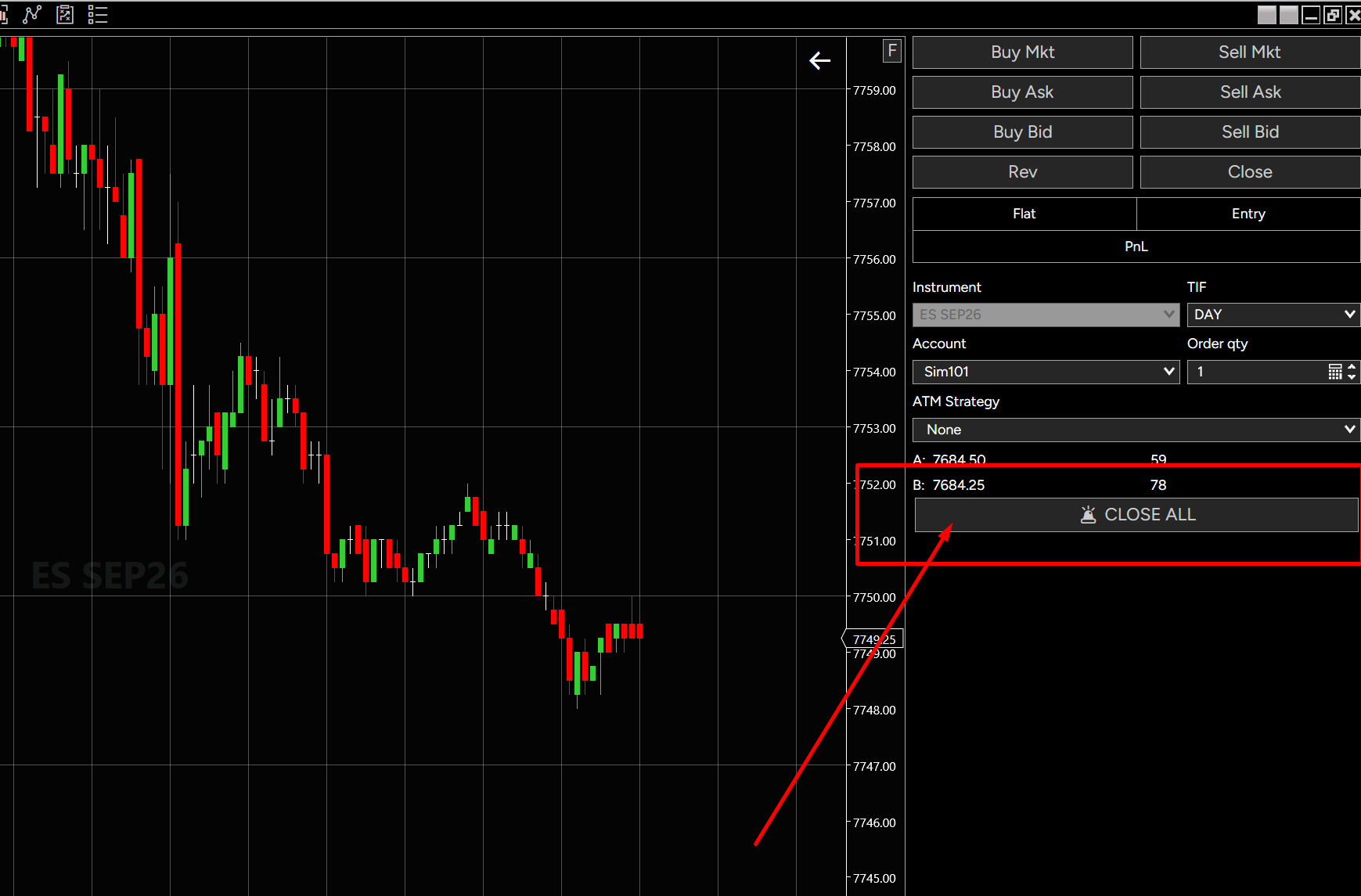
PnL monitoring and performance summary:
View the closed PnL from completed trades and the open PnL from positions that remain active. From “View summary,” you can review the combined results of all groups and the details by group or account.Privacy when sharing results:
The “Hide names” feature lets you hide identifying account information. You can also copy the summary image to share your results without exposing full account names.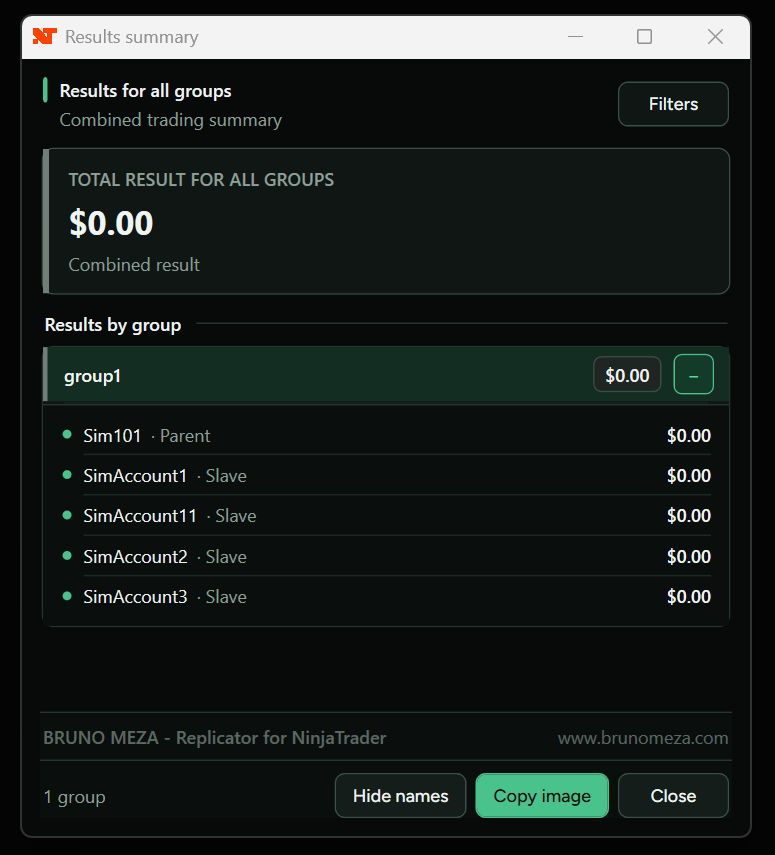
A window designed for your workspace:
The “Pin” feature saves the trade copier window’s position and size so you can reuse your layout. The overlay option keeps the trade copier above other windows while you trade and can be disabled when you prefer to use it as a normal window.Normal mode and Market Edition
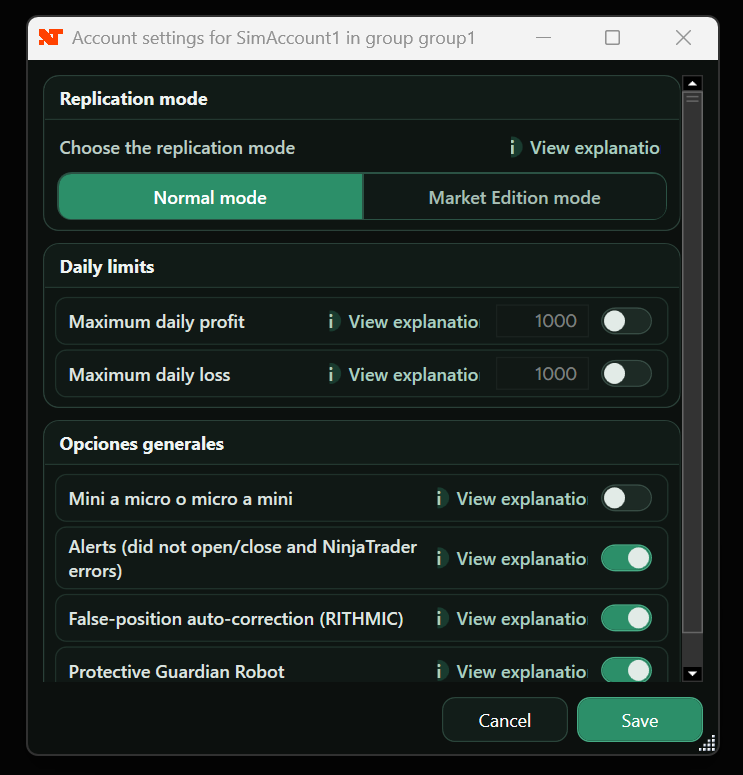
Normal mode
The recommended mode for most users. It preserves conventional replication and avoids the additional conversion of limit orders into market orders used by the special mode.
Market Edition
Market Edition (A special operating mode):
Market Edition is a special way to use the trade copier. This mode converts limit orders from the “Master” account into market orders for follower accounts, ensuring that they all enter and exit at the same time without waiting for liquidity. Although it may cause some slippage, it ensures that all your accounts remain perfectly synchronized, eliminating the risk that an order will not be filled in one of them. This mode changes the execution system and is not recommended for most users. If you are a beginner, we recommend keeping Normal Mode, which is used and recommended for approximately 95% of traders.Contrary within Market Edition:
This feature allows a follower account to trade in the opposite direction from the master account: if the master buys, that follower sells; and if the master sells, the follower buys. Contrary works only within Market Edition, so you must first understand how that mode works before enabling it.Slippage is possible. Contrary is available only in Market Edition.
Telegram, TradingView and Tradovate
Telegram alerts:
With this trade copier, you can configure a Telegram chatbot and control your trade copier remotely through that chat. This feature can request account information from the chatbot (profit/loss, balance, etc.), close open trades, disable replication, and more.Trade your master account from TradingView or Tradovate:
If you wish, you can trade your master account from TradingView or Tradovate. Remember that the trade copier IS for NinjaTrader 8, so you must keep NinjaTrader 8 open, with the connections to your master and follower accounts established alongside TradingView or Tradovate, for trades to be copied.NinjaTrader 8 open, connected and running the copier
Greater protection when trading directly from NinjaTrader:
Although you can trade the master account from TradingView or Tradovate, certain additional protection and safety algorithms can operate only when the trade is placed directly from NinjaTrader. Therefore, if you know how to use NinjaTrader, we recommend trading from it whenever possible to take full advantage of the available protections.3️⃣ Other trade copier features
Contracts and conversions
- Adjust the number of contracts for each account independently.
- Copy from mini to micro or micro to mini.
- Copy different contract quantities to follower accounts.
- General and instrument-specific multipliers.
- Maximum number of contracts per follower account.
Groups and control
- Multiple groups with independent master and follower accounts.
- Instrument exclusions by group.
- ON/OFF switches for accounts and groups.
- Individual, group, and global closing.
- Emergency button inside Chart Trader.
Monitoring and safety
- Safety alerts for each account if it fails to open or close.
- Maximum daily loss and maximum daily profit.
- Automatic trading view.
- Open and closed PnL and combined summary.
- Hide names and copy the summary image.
Window and remote control
- Save the window’s position and size.
- Optional overlay above other windows.
- Alerts through Telegram.
- Remote summary requests.
- Remote commands for closing and controlling groups.
4️⃣ How do you configure and use the Trade Copier for NinjaTrader 8?
Configuration is performed through a visual window inside NinjaTrader 8. Once the product is installed and your accounts are connected, the basic procedure is as follows:
- 1Open and connect NinjaTrader 8
Enable the Multi-provider feature if your version includes it, and connect your prop firm or broker accounts through Tradovate, Rithmic, CQG, or another compatible provider.
- 2Select the master account
This is the account you will trade manually and whose entries, changes, and closings you want to copy.
- 3Select the follower accounts
Select every account that will receive trades and configure its multiplier, Mini/Micro conversion, contract limit, and other parameters.
- 4Trade and monitor
Trade the master account normally. Keep NinjaTrader and the trade copier window open to monitor the accounts and use the closing controls when necessary.
You can create different groups if you need multiple master accounts or independent configurations. Each group can have its own follower accounts, multipliers, instrument exclusions, and ON/OFF status.
If you want to practice before using live or prop firm accounts, you can create additional simulation accounts within NinjaTrader. After creating them, disconnect and reconnect so that NinjaTrader properly enables the new accounts.
Important if you trade from TradingView or Tradovate: you must keep NinjaTrader 8 open, connected, and running the trade copier on the same computer. TradingView or Tradovate controls the master account, but replication continues to take place within NinjaTrader 8.
5️⃣ Comparison table against other companies
Trade Copier for NinjaTrader 8 Comparison| Feature | Bruno Meza | Other Companies |
|---|---|---|
| Copies trades between accounts at the same company | Yes | Yes |
| Generic installation tutorial | Yes | Yes |
| Copies different contract quantities | Yes | Yes |
| Copies from mini to micro | Yes | Yes |
| Copies trades between accounts at different prop firms on the same computer | Yes | Partially |
| Account monitor | Yes | No |
| Replication groups | Yes | No |
| Control replication from the monitor (enable/disable, view, monitor, and close trades) | Yes | No |
| Supports UNLIMITED accounts without consuming many resources | Yes | No |
| Trade your master account from TradingView or Tradovate | Yes | No |
| Free, self-service, unlimited computer changes | Yes | No |
| Alerts for important events (trade fails to open/close, insufficient ATM, etc.) sent to a Telegram chatbot | Yes | No |
| Trade copier action and control commands through a Telegram chatbot | Yes | No |
| Automatic false-position resolution | Yes | No |
| Guardian Protector(Emergency anti-desynchronization closing) | Yes | No |
| Intelligent buttons | Yes | No |
| Intelligent ATM order algorithms | Yes | No |
| Queued target and stop system based on filled contracts | Yes | No |
| Automatic cleanup of remaining orders | Yes | No |
| Safe-closing algorithms to prevent race conditions | Yes | No |
| Intelligent order execution algorithms | Yes | No |
| Safety alerts for each account if it fails to open or close (pop-up) | Yes | No |
| Version Market Edition included free of charge | Yes | No |
| Contrary Mode within Market Edition | Yes | No |
| Exclusion of specific instruments by group | Yes | No |
| Independent multipliers by instrument and account | Yes | No |
| Maximum daily loss and maximum daily profit limits by account | Yes | No |
| Automatic trading view for multiple groups and accounts | Yes | No |
| Individual, group, and global emergency closing | Yes | No |
| Emergency button integrated into Chart Trader | Yes | No |
| Open and closed PnL summary by account, group, and total | Yes | No |
| Privacy mode to hide names and share the summary | Yes | No |
| Configurable window position, size, and overlay | Yes | No |
| Nearly 24/7 support and immediate product delivery | Yes | No |
| Lifetime support and updates | Yes | No |
| Trading journal and personal finance manager included | Yes | No |
| Works on computers with very limited resources | Yes | No |
| One configuration for all instruments | Yes | No |
| Average cost per lifetime license | $89.95 | $250 |
Compatibility, limits and conditions
Read all requirements before purchasing a license.
Move your license to new computers at no additional cost:
Unlike other trade copiers that limit your license to one machine, with the NinjaTrader 8 to NinjaTrader 8 Trade Copier you can move your license from one computer to another whenever you wish, 100% independently. There are no additional costs or limits on the number of times you can make the change. One change can be made every 2 days, provided that the new device continues to belong to the license owner.Updates, support, and additional tools:
Your purchase includes personalized support and lifetime updates. It also includes access to additional tools offered with our products, such as the trading journal and personal finance manager.6️⃣ Important details
- The NinjaTrader 8 to NinjaTrader 8 Trade Copier requires a one-time payment, with no monthly fees, granting you the product forever.
- Your purchase includes lifetime support and updates.
- Each license works on only one computer, and the copier operates locally. It copies trades among accounts open on the same PC. PC-to-PC replication is not supported.
- If you trade the master account from TradingView or Tradovate, NinjaTrader 8 must remain open, connected, and running the trade copier on that computer.
-
The copier works within NinjaTrader 8 Desktop, a platform available for Windows.
If you use a Mac, you can still use the copier by virtualizing Windows through virtualization software. We have prepared a simple guide to help you with this process: View Mac guide →
Before purchasing, please keep in mind that using the copier on a Mac requires Windows to be virtualized. We are unable to accept refund requests related to not being aware of this compatibility requirement.
The product is a trade copier for NinjaTrader, so it is understood that the user knows the basic requirements of NinjaTrader 8 Desktop. Even so, we reaffirm this compatibility requirement here to avoid any confusion before purchase.
- To use all available protections, we recommend trading directly from NinjaTrader 8 whenever possible.
- The credentials, servers and availability of each connection depend on the corresponding prop firm, broker or provider. External authentication or connection problems do not depend on the trade copier.
- The trade copier copies and monitors the trades you place. It does not create signals, execute a strategy on its own, or guarantee profits or trading results.
- One license works locally on one computer; it does not replicate from PC to PC.
- Market Edition may produce slippage; normal mode is recommended for most users.
- It does not generate signals or guarantee results; credentials and connections depend on the provider.
7️⃣ Frequently Asked Questions About the Trade Copier for NinjaTrader 8
What is a Trade Copier for NinjaTrader 8?
It is software that lets you select a main or “Master” account and automatically copy its trades to multiple secondary or “Follower” accounts connected to NinjaTrader 8. The BRUNO MEZA Trade Copier adds monitoring tools, groups, multipliers, and protection algorithms for working with multiple accounts.Can I copy accounts from different prop firms?
Yes. You can copy trades between accounts at the same firm or at different prop firms and brokers, provided that the accounts can connect to NinjaTrader 8. When two connections cannot remain active in the same instance, as occurs when using several different firms with Rithmic, you can use additional NinjaTrader instances on the same computer.How many accounts can I use?
The trade copier does not set a maximum number of accounts, connections, or firms. You can copy an unlimited number of accounts. Practical capacity depends on your computer’s resources, NinjaTrader, and the connections you use.Does it work with Rithmic and Tradovate?
Yes. You can use Tradovate, Rithmic, and other providers compatible with NinjaTrader 8. NinjaTrader allows only one Rithmic-type connection to remain active within a single instance; for a second firm using Rithmic, you must use another NinjaTrader instance on the same computer (this procedure is explained in the installation video).Can I trade from TradingView or Tradovate?
Yes. You can trade the master account from TradingView or Tradovate, but the trade copier continues to run inside NinjaTrader 8. Therefore, you must keep NinjaTrader open, connected, and running the trade copier. It is not a native TradingView or Tradovate trade copier.Is it better to trade the master account from NinjaTrader?
Yes, provided that you know the platform. Some additional protection algorithms can only act when the trade is executed directly from NinjaTrader. TradingView and Tradovate remain compatible, but trading from NinjaTrader lets you take advantage of the most complete set of protections.Can I use different contract quantities?
Yes. Each follower account can have its own general multiplier and instrument-specific multipliers. You can also convert from Mini to Micro or from Micro to Mini according to the settings available for each account.What happens if a follower fills fewer contracts than the master account?
The queued target and stop system protects only the quantity actually filled in the follower. If more contracts are filled later, the trade copier adds the corresponding protection according to the master account’s ATM, preventing exits from being placed for a quantity greater than the actual position.Does the trade copier include daily limits?
Yes. You can set a maximum daily loss and a maximum daily profit for each follower account. When the configured limit is reached, the trade copier closes its open positions and disables its replication. These limits can be modified by the user and do not replace the Emotional Manager when you need broader restrictions or restrictions that are difficult to modify.Can I close trades remotely?
Yes. The Telegram integration lets you receive certain alerts, request summaries, and perform actions available in the current version, such as closing all trades, closing a group, and enabling or disabling groups. Telegram is an additional tool and does not replace monitoring the computer.Do I need to pay a monthly fee?
No. The Trade Copier for NinjaTrader 8 requires a one-time payment and includes lifetime support and updates according to the product terms.In summary: this is not merely about copying an order from one account to another. The BRUNO MEZA Trade Copier for NinjaTrader 8 combines replication, monitoring, and protection mechanisms to help you manage multiple accounts from a single computer in a more organized way.
One master account. Your replication structure.
Trade a master account and replicate its trades to different NinjaTrader 8 accounts, including across firms and connections, from a single computer.
FREE access to Trading Journal and Personal Finance when you buy any product
You will also obtain unlimited, free access to two exclusive tools from brunomeza.com: the Trading Journal and the Personal Finance section.
You may also like
![Bidirectional NinjaTrader 8 ↔ MetaTrader 5/4 Replicator [Unlimited Accounts]](/assets/optimized/bidirectional-en-01.webp)
Bidirectional NinjaTrader 8 ↔ MetaTrader 5/4 Replicator [Unlimited Accounts]
Copy trades between NinjaTrader 8 and MetaTrader 4/5 in either direction.
![NinjaTrader 8 to CTrader Replicator [Futures and CFDs]](/assets/optimized/nt8-ctrader-en-01.webp)
NinjaTrader 8 to CTrader Replicator [Futures and CFDs]
Send NinjaTrader 8 trades to cTrader accounts using Market Edition.
